






TL;DR
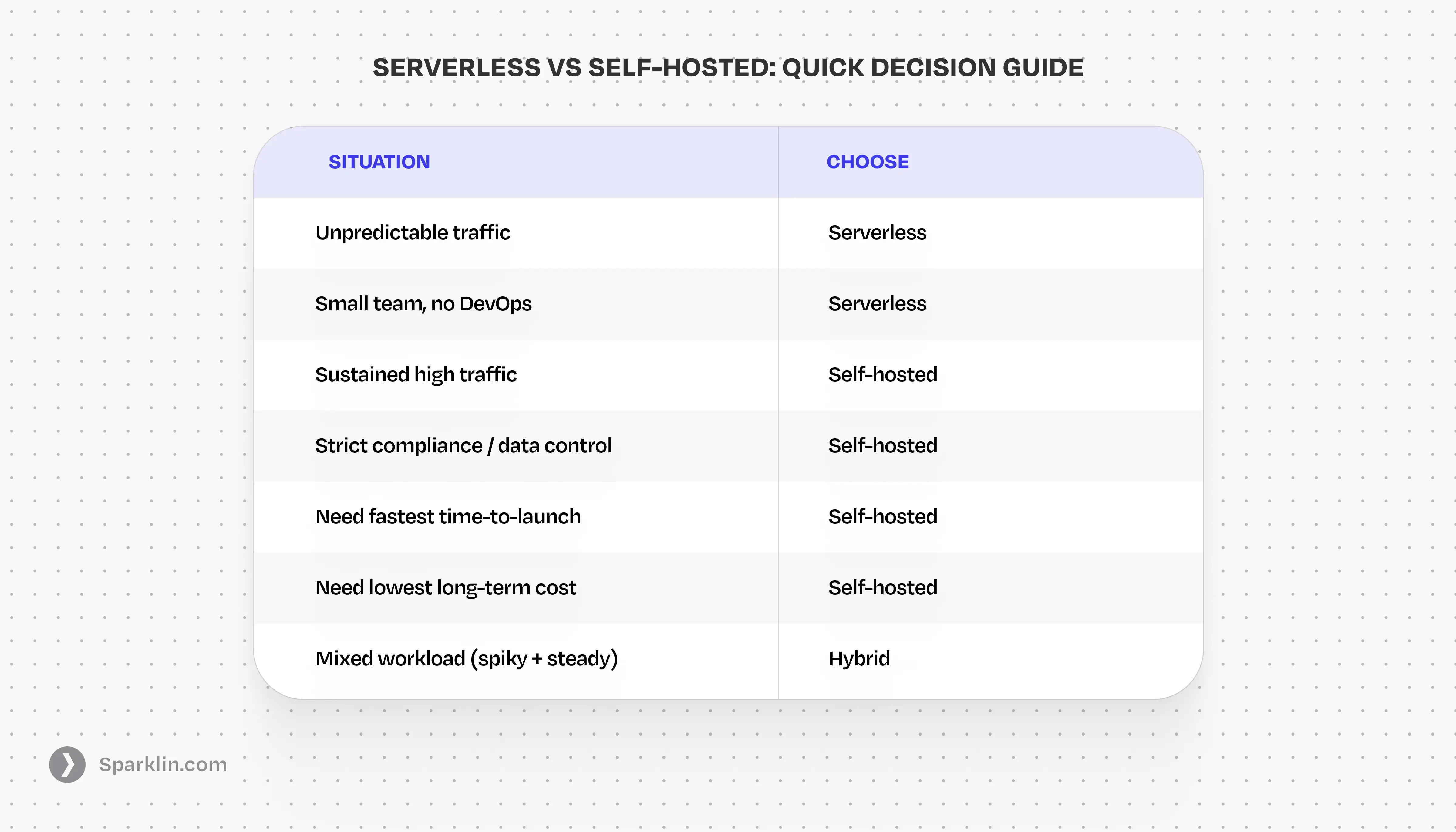
If you're an early team with unpredictable traffic and no dedicated DevOps, serverless is almost always the right starting point. You pay for what you use, you ship faster, and you don't need someone on-call at 3 AM.
Once you're running predictable, sustained workloads or you have strict data-residency, compliance, or cost requirements at scale, the math flips. Self-hosted infrastructure gives you control, performance, and cost efficiency that serverless can't match beyond a certain usage threshold.
The trap most teams fall into: they stay on serverless too long because moving feels hard, and then face a bill that could fund a small engineering team. Or they go self-hosted too early and spend six months on infrastructure instead of product.
Tech Infrastructure decisions decide how fast you ship, how much you spend, and when your system starts pushing back. The choice between serverless and self-hosted shapes your team's velocity, your monthly spend, your compliance posture, and how much time goes into keeping lights on versus building new things.
Most teams make this call based on what they already know, what the last engineer on the team used, or what was trending when they started. That's path dependence and not a framework.
If you’re a founder, this decision translates directly into speed or friction. Teams either ship faster because infrastructure stays out of the way, or slow down because every change touches too many moving parts.
This guide is a direct, stage-by-stage breakdown of when each approach wins, what the real costs look like, and how to know when it's time to switch.
What Is Serverless Infrastructure?
Serverless means you deploy code without managing the underlying servers. The cloud providers, such as AWS Lambda, Google Cloud Run, Vercel, Cloudflare Workers, handle provisioning, scaling, and availability automatically. You write functions or containers, define triggers, and pay per invocation or execution time.
The name is slightly misleading. There are servers but you just don't own, configure, or worry about them. That abstraction is the whole point.
Serverless is widely used for APIs, background jobs, event-driven pipelines, scheduled tasks, and web applications where traffic is spiky or hard to predict. The appeal is simple: zero infrastructure overhead, instant scalability, and a pay-per-use cost model that looks very attractive before you hit scale.
Advantages Of Going Serverless
- No server provisioning or maintenance
- Scales to zero, you pay nothing when idle
- Instant horizontal scaling on traffic spikes
- Zero DevOps overhead at early stages
- Fast deployment and iteration cycles
- Built-in high availability across regions
Disadvantages Of Going Serverless
- Cold start latency on infrequent functions
- Costs spike unpredictably at high volume
- Execution time and memory limits per function
- Harder to debug locally; observability requires setup
- Vendor lock-in to provider-specific APIs
- Poor fit for long-running or stateful workloads
Popular Serverless Services Worth Knowing
The serverless ecosystem has expanded well beyond Lambda. Here are the platforms most teams are actually using in production, grouped by what they do.
Compute
- AWS Lambda: most mature, deeply integrated with AWS
- Google Cloud Run: container-first, more runtime control
- Cloudflare Workers: ultra-low latency, edge-first
- Vercel Functions: easiest for frontend teams, limited headroom
Databases
- PlanetScale: scaling + branching workflows
- Neon: scale-to-zero Postgres
- Supabase: Postgres + auth + APIs
- Amazon DynamoDB: high throughput, different mental model
Queues and Event Processing
- AWS SQS: reliable, simple queueing for async workloads
- AWS EventBridge: event routing across AWS services, great for decoupled systems
- Inngest: modern background jobs with built-in retries and observability
- Trigger.dev: developer-friendly job orchestration without managing queues manually
Storage and CDN
- AWS S3: industry standard for durable, scalable object storage
- Cloudflare R2: S3-compatible storage with zero egress fees, cost-efficient at scale
- Cloudflare CDN: simple, fast global caching with strong edge presence
- AWS CloudFront: tightly integrated with AWS, powerful but more complex to configure
What Is Self-Hosted Infrastructure?
Self-hosted means you run your own servers, whether on bare metal, VMs on a cloud provider (EC2, GCE, DigitalOcean), or on-premises hardware. You control the OS, the runtime, the network configuration, and every layer of the stack below your application code.
Most modern self-hosted setups use containers and orchestration tools like Kubernetes or Nomad, are deployed on cloud VMs, and use modern CI/CD pipelines. The difference from serverless is ownership: you decide what runs where, and you're responsible for keeping it running.
Self-hosting is the right model for workloads that are predictable, data-sensitive, cost-sensitive at scale, or architecturally complex in ways that serverless platforms can't accommodate.
Advantages of Being Self-Hosted
- Predictable, flat cost model at scale
- Full control over data residency and compliance
- No cold starts, no execution time limits
- Better performance for CPU/memory-intensive tasks
- No vendor lock-in portable across providers
- Custom network topologies and security posture
Disadvantages of Being Self-Hosted
- Requires DevOps expertise to manage
- Higher upfront setup and infrastructure cost
- Scaling requires planning — not automatic
- You're responsible for uptime and patching
- On-call burden for infrastructure incidents
- Slower initial deployment vs. serverless
Serverless vs Self-Hosted: Which is better?
The right infrastructure decision depends entirely on where your product and team are today. Here's how the calculus changes as you grow.
Stage 01 — Pre-Launch / MVP
Go Serverless: Your traffic is zero to nothing, your architecture will change completely, and your team has no bandwidth for infrastructure management. Serverless removes an entire category of early-stage risk. Ship to Vercel, use managed databases, and don't think about servers until you have a reason to.
Stage 02 — Early Traction (0–50K users)
Serverless with Managed Services: Stay serverless for compute, but add managed infrastructure for stateful components such as a managed Postgres, a hosted queue, a CDN. Your traffic is still irregular and the operational simplicity is worth the higher per-unit cost. Watch your bill closely; this is where spend starts to creep.
Stage 03 — Sustained Scale (50K–500K users)
Hybrid — Serverless Edge, Self-Hosted Core: At this stage, you likely have predictable baseline traffic with spiky peaks. The right move is a hybrid: serverless for edge, API gateways, and event-driven tasks; self-hosted containers for your core application servers. This combination gives you cost efficiency on the baseline and elasticity on the peaks.
Stage 04 — High Scale / Enterprise (500K+ users)
Self-Hosted Core with Selective Serverless: At sustained high volume, the serverless cost premium becomes indefensible. A single reserved EC2 fleet running 24/7 workloads will be 60–80% cheaper than Lambda at equivalent throughput. Self-hosted becomes the default; serverless survives only in truly elastic, sporadic workloads where the economics still hold.
The Cost Comparison Between Serverless vs Self-Hosted Infrastructure
The upfront numbers heavily favour serverless. But the full picture over two to three years is more complicated than the AWS pricing calculator suggests.
Getting started on serverless costs almost nothing. You can deploy a working API in an afternoon with no servers to provision, no DevOps setup, and no need for an infrastructure team. That low friction is real, and it's genuinely valuable in the early stages. The real issue is how the cost curve changes as you grow.
When traffic is low or irregular, serverless is extremely economical. You pay only for actual execution time, and when usage drops to zero, so does your bill. This is a structural advantage over self-hosted, where a server sitting idle still costs money every month. For early-stage products with unpredictable traffic, that idle cost adds up fast.
The economics shift sharply once your workload becomes sustained and predictable. At high volume, per-invocation pricing compounds quickly. A reserved fleet of EC2 instances running equivalent throughput 24/7 is typically 60–80% cheaper than Lambda at the same scale. That's the difference between a $3,000 monthly bill and a $15,000 one for the same product.
A backend doing ~100M requests/month on Lambda can easily cross $10–15K depending on execution time. The same workload on a small reserved EC2 cluster can run under $4–5K with a predictable cost.
DevOps overhead is the other cost most teams undercount. Serverless feels free to operate until it isn't. Debugging distributed traces across fragmented function logs, managing cold start behaviour, or wiring together observability across ten different function invocations takes real engineering time. Self-hosted infrastructure has its own operational cost, but it's upfront and predictable, not a slow tax on every debugging session.
The Cost Nobody Models: Migration
Most teams switch from Serverless to Self-Hosted infrastructure because something breaks: the bill hits a ceiling, performance degrades, or a compliance audit forces the issue. That's the worst time to be making foundational infrastructure decisions. Re-platforming on a live system under those conditions typically consumes two to four months of senior engineering time. The teams that do it well started planning before they were forced to.
The hidden numbers:
When a team migrates from serverless to self-hosted under pressure because the bill exploded or the architecture hit a wall, the re-platforming typically costs two to four months of engineering time on a live system, with users watching. Plan the transition on your terms, not theirs.
When Enterprise Requirements Change Everything
Enterprise software procurement involves conversations that most serverless platforms aren't designed to survive. Data residency requirements, for example, where your data lives, who can access it, and under which jurisdiction, are non-negotiable in regulated industries. SOC 2, ISO 27001, HIPAA, and GDPR compliance require full control over your infrastructure stack in ways that shared serverless environments can complicate or prevent entirely.
This doesn't mean serverless is incompatible with compliance. AWS Lambda inside a VPC with proper IAM policies can satisfy many enterprise requirements. But it takes significant architectural work to get there. Work that self-hosted infrastructure makes structurally easier from the start.
If your roadmap includes enterprise clients, build your infrastructure with that audit in mind. Retrofitting compliance onto a serverless architecture that was never designed for it is one of the more painful engineering exercises a team can undertake.
When should you switch from serverless to self-hosted?
Your infrastructure bill is unpredictable
When month-end billing surprises become a regular event, and the pattern is always upward, you've moved past the stage where serverless economics make sense. A single traffic spike shouldn't be able to add thousands to your bill.
Cold starts are affecting your product experience
In production applications where latency matters, especially for synchronous user-facing APIs, cold starts become a real product problem. No amount of keep-warm hacks fully solves this at scale.
You're hitting execution limits regularly
Functions timing out, memory limits forcing architectural compromises, or batch jobs that exceed platform constraints are accumulating architectural debt in real time. These limits exist for a reason; fighting them is a signal to move.
A compliance review is exposing gaps
When a security review or enterprise procurement process surfaces questions your serverless setup can't cleanly answer, that's the infrastructure equivalent of enterprise deals being blocked by platform limitations. Fix the foundation before the deal is on the table.
Your DevOps team exists now
If you've hired people who can manage servers well, the main argument for serverless is to avoid operational overhead. But if you have a DevOps team, this no longer applies with the same force. The cost efficiency and control of self-hosting become accessible.
The Hybrid Model That Most Teams Land On
The binary framing of serverless vs. self-hosted doesn't reflect how most mature architectures actually work. The realistic answer for teams beyond early traction is a deliberate hybrid: serverless where it makes structural sense, self-hosted where it doesn't.
A common pattern that works well: static assets and edge logic on a CDN or serverless edge network; event-driven background jobs on serverless functions; core application servers running on containerised self-hosted infrastructure; managed databases that are neither fully serverless nor self-hosted.
The mistake isn't choosing hybrid, it's drifting into it without intention. When hybrid architectures accumulate organically, you end up with complexity in multiple systems without the benefits of either. The teams that get it right plan the boundary from the start: which layer is temporary, which is meant to last, and what the migration path looks like when the temporary becomes permanent.
A common production setup for the Hybrid Model:
- Frontend + edge logic on Cloudflare / Vercel
- APIs on containerised services (ECS / Kubernetes)
- Background jobs on serverless functions
- Managed database (RDS / Neon)
How Sparklin Helps You Make the Right Call
Most teams think they're picking an infrastructure stack. They're not. They're picking how the next two years of building will feel, including how fast they can ship, how much time goes into firefighting, and whether the system they're on will still make sense when they're ten times the size.
At Sparklin, we're an end-to-end design and technology agency. That means we work across the full product stack from how a product looks and feels to how it's architected and built. Our tech team has made this serverless vs. self-hosted call for products at different scales and in different industries. We know where the traps are, what the migration costs actually look like, and how to design systems that don't need to be rebuilt from scratch twelve months later.
Some of our clients come to us, figuring out how to launch without burning money on infrastructure they don't need yet. Others have outgrown their current stack and need to make the transition without losing momentum on a live product. There's no universal right answer here, and anyone who tells you otherwise is selling something.
If you're working through this decision, whether that's a greenfield product, a migration, or just a bill that's started asking hard questions, we're happy to have a direct conversation about your specific situation. Write to us at hello@sparklin.com.
Frequently Asked Questions
Is serverless always cheaper than self-hosted?
No, and this misconception costs teams real money. Serverless is cheaper when traffic is low, irregular, or bursty. At sustained high volume, the per-invocation pricing model typically makes self-hosted infrastructure significantly more economical. The break-even point varies by workload, but for many applications running continuous traffic, reserved cloud VMs are 60–80% cheaper than equivalent Lambda throughput.
Can I migrate from serverless to self-hosted without downtime?
Yes, but it requires planning. The cleanest migrations are done incrementally. Go with serverless functions first, then deploy those containers to self-hosted infrastructure behind a feature flag, then gradually shift traffic. Attempting a big-bang migration on a live product is risky. The teams that do it well start planning before they're forced to.
What's the right infrastructure choice for a startup that expects enterprise clients?
Go self-hosted or design your serverless architecture with enterprise compliance in mind from day one. Enterprise procurement will surface data residency, access control, and audit requirements early in the sales process. The last thing you want is infrastructure being the reason a contract stalls.
Does serverless work for AI or ML workloads?
Rarely well. AI inference and training workloads are CPU/GPU-intensive, often long-running, and frequently exceed the memory and execution-time limits of serverless platforms. For anything beyond lightweight model calls via a third-party API, self-hosted GPU instances or purpose-built ML infrastructure is typically the right answer.
How do I calculate the true cost of self-hosted infrastructure?
Factor in the full set: compute and storage, networking and egress, monitoring and observability tooling, security and compliance tooling, and critically, the engineering time cost of maintenance and on-call. Teams often forget the last category. A well-run self-hosted environment isn't free to operate; it's just cheaper per unit of compute at scale than the serverless alternative.
What's the difference between self-hosted and on-premises?
Self-hosted typically means running your own servers on cloud VMs you control, without owning physical hardware. On-premises means owning the physical hardware in a data centre or office. Most modern "self-hosted" setups are cloud-based; true on-prem is relatively rare outside regulated industries with specific data localisation requirements.